import { Redline } from "@/components/ui/redline";
const photo =
"https://images.unsplash.com/photo-1507473885765-e6ed057f782c?auto=format&fit=crop&w=480&h=360&q=80";
export function RedlineDemo() {
return (
<section className="w-full max-w-4xl text-zinc-900 dark:text-zinc-50">
<div className="grid gap-x-10 gap-y-3 sm:grid-cols-2 sm:items-end">
<div>
<p className="font-mono text-xs tracking-widest text-zinc-500 uppercase">Craft</p>
<h3 className="mt-2 text-3xl font-semibold tracking-tight text-balance">
We sweat the details you'll never notice
</h3>
</div>
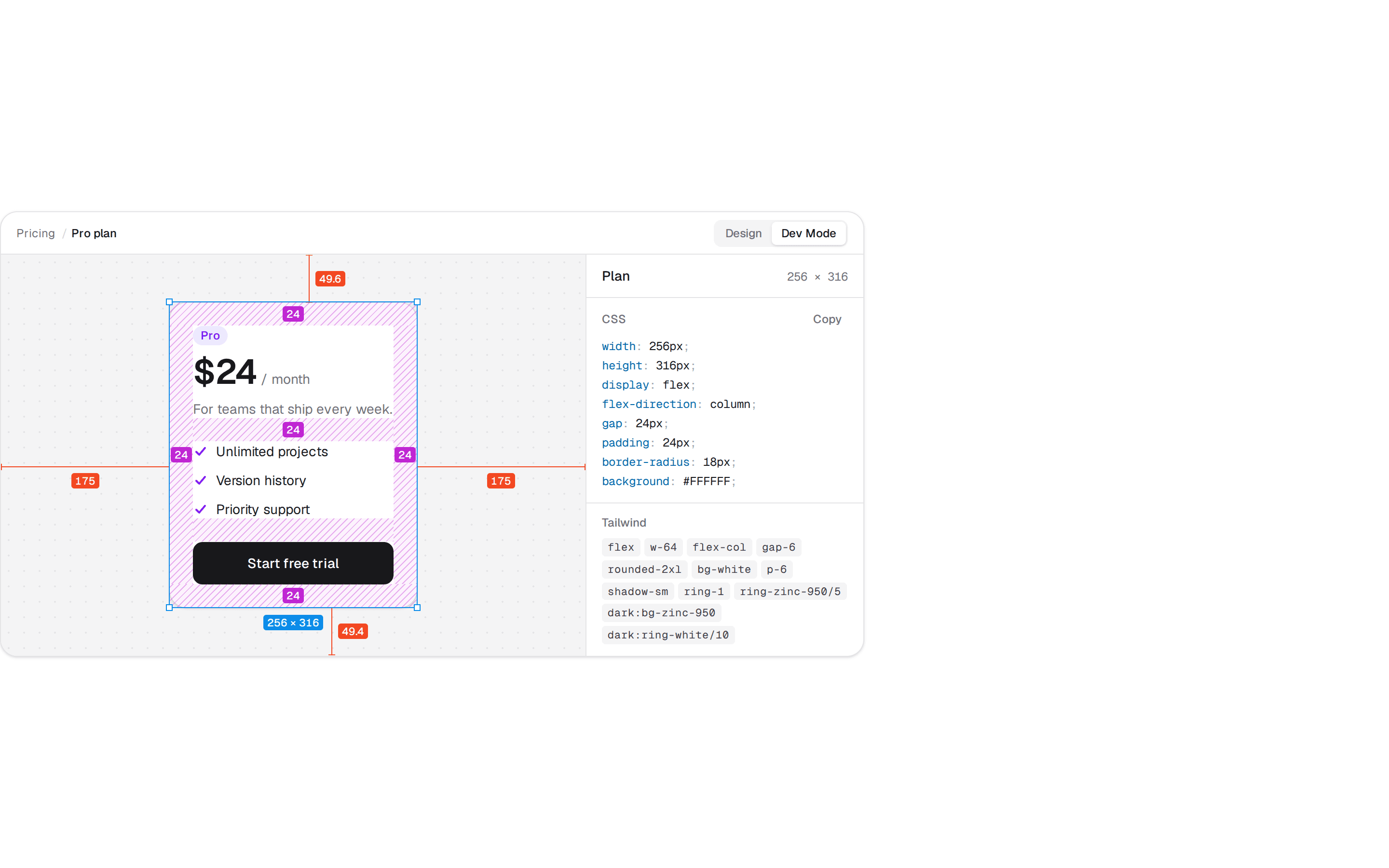
<p className="text-sm/6 text-pretty text-zinc-600 dark:text-zinc-400">
Every space on this card was decided, not defaulted. Point at anything to see its
numbers, click to pin it, then hold <span className="font-medium">⌥</span> and point at
another to measure between them.
</p>
</div>
<Redline
tour={["card", "details", "button", "photo"]}
spec
className="mt-8 flex justify-center rounded-2xl border border-zinc-200 bg-zinc-50 bg-[radial-gradient(circle,rgb(0_0_0/0.07)_1px,transparent_1px)] bg-size-[16px_16px] px-6 py-14 dark:border-zinc-800 dark:bg-zinc-900/60 dark:bg-[radial-gradient(circle,rgb(255_255_255/0.06)_1px,transparent_1px)]"
>
<article
data-redline="card"
className="flex w-64 flex-col gap-4 rounded-2xl bg-white p-3 shadow-[0_1px_2px_rgb(0_0_0/0.05),0_12px_32px_-16px_rgb(0_0_0/0.25)] ring-1 ring-zinc-950/5 dark:bg-zinc-950 dark:ring-white/10"
>
{/* eslint-disable-next-line @next/next/no-img-element -- a remote photo in an installable demo */}
<img
data-redline="photo"
src={photo}
alt="A gray floor lamp against a white wall"
draggable={false}
className="aspect-4/3 w-full rounded-lg bg-zinc-100 object-cover dark:bg-zinc-900"
/>
<div data-redline="details" className="flex flex-col gap-1">
<h4 data-redline="title" className="text-base/6 font-medium tracking-tight">
Kessel Floor Lamp
</h4>
<p data-redline="price" className="text-sm/5 text-zinc-500 tabular-nums dark:text-zinc-400">
$240
</p>
</div>
<button
data-redline="button"
type="button"
className="h-11 rounded-lg bg-zinc-900 px-4 text-sm font-medium text-white dark:bg-zinc-50 dark:text-zinc-900"
>
Add to cart
</button>
</article>
</Redline>
</section>
);
}